Overview
Many reverse engineering blogs focus on deep code analysis and uncovering complex behaviors. While those write-ups are valuable, incident responders often do not have the luxury of spending hours or days reversing a sample during an active investigation.
This post explores a different approach: how much intelligence can we extract from a malware sample in two hours using only open-source tools?
Rules:
- Select a malware sample from an open source repository
- Set a two-hour analysis timer
- Use only open source analysis tools
- Extract and document as many indicators of compromise (IOCs) as possible
In my experience, when responding to an active incident we are looking to identify malcious qualities quickly and generate signatures if necessary. We may have more than 2 hours to do this, but why not challenge ourselves and see what we can do! And with that, lets see what we can learn!
Tools Used
- VirusTotal
- PEstudio
- Wireshark
- Procmon
- Process Hacker
- x64dbg
The Malware
This sample was found on malwarebazaar (great malware sample sharing site) and was uploaded by Bitsight on March 7th, 2026. The sample is a 64-bit portable executable (PE) file. Based on yara signatures on malwarebazaar there is some suspicious activity, but it is unclear what the sample is actually doing. The following are the hash values for the sample:
- MD5 = 597cde9789028eb2f6e362a733a9081b
- SHA-1 = d8a1def4461c1e6315e65ee4690babd6142ba60e
- SHA-256 = b93fd9dfa9d03389fc29b4cbeff96b1ebf2da55fd90ef11e64a193bb98d66eb8
With the timer started, let’s begin the analysis.
Initial Analysis
2 hours, lets get cracking! First thing I always do is check the hash on VirusTotal. If there is any open source reporting, why repeat work? Always verify of course, but this can speed up our response! At the time of analysis there were 12/72 hits.
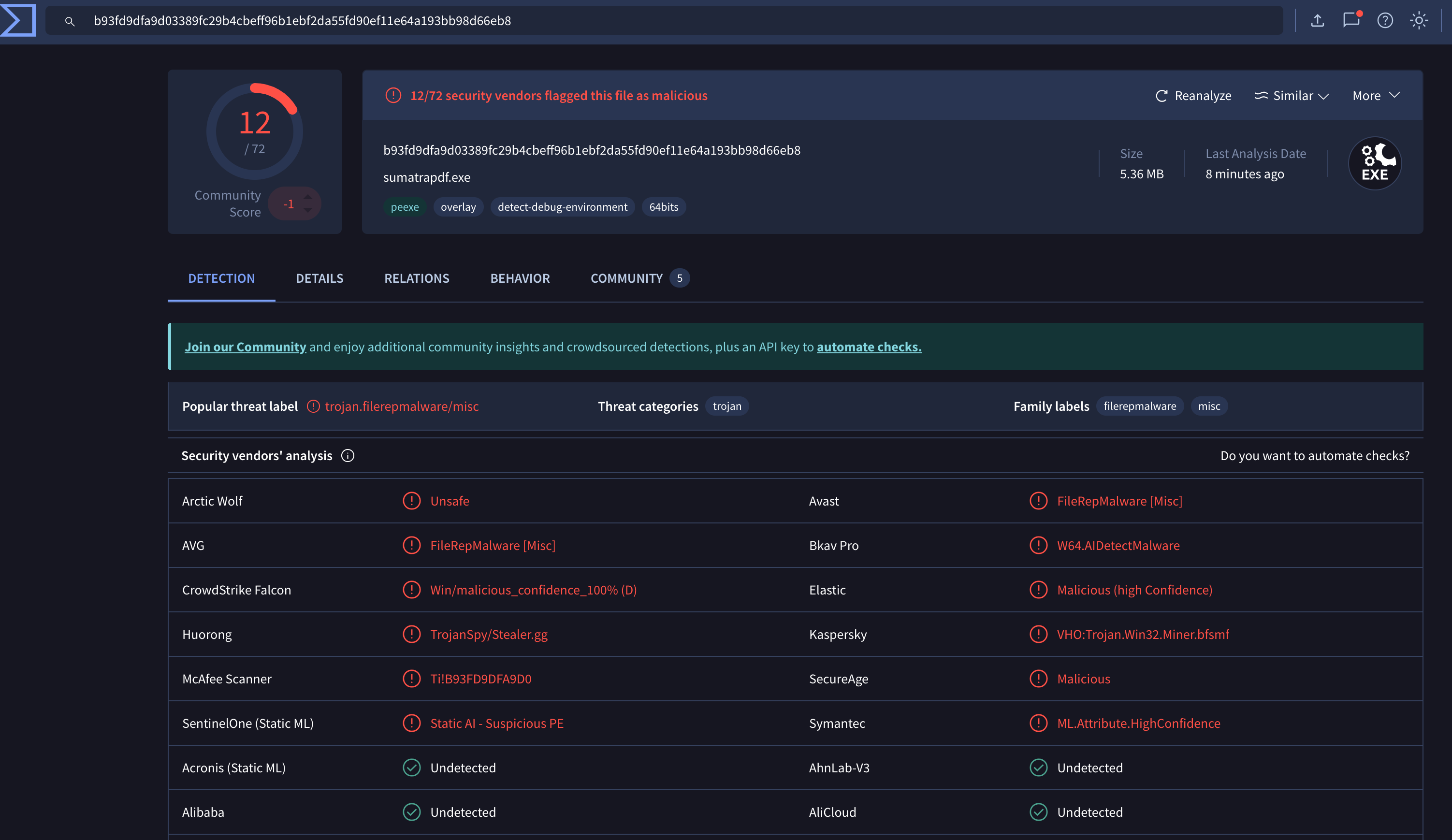
Okay, great to know! Multiple vendor detections suggest the file may be malicious, although these results should always be verified independently. VirusTotal is a great starting point, but we can’t assume that these vendors are always correct.
Next, I threw it into PEstuido. The first notable observation was that the binary appeared to be signed by Microsoft. Additionally, the samples original file name of “sumatrapdf.exe”. Weirdly enough, it also seems to be used by Microsoft Defender. Also of note, this sample is written in Rust.
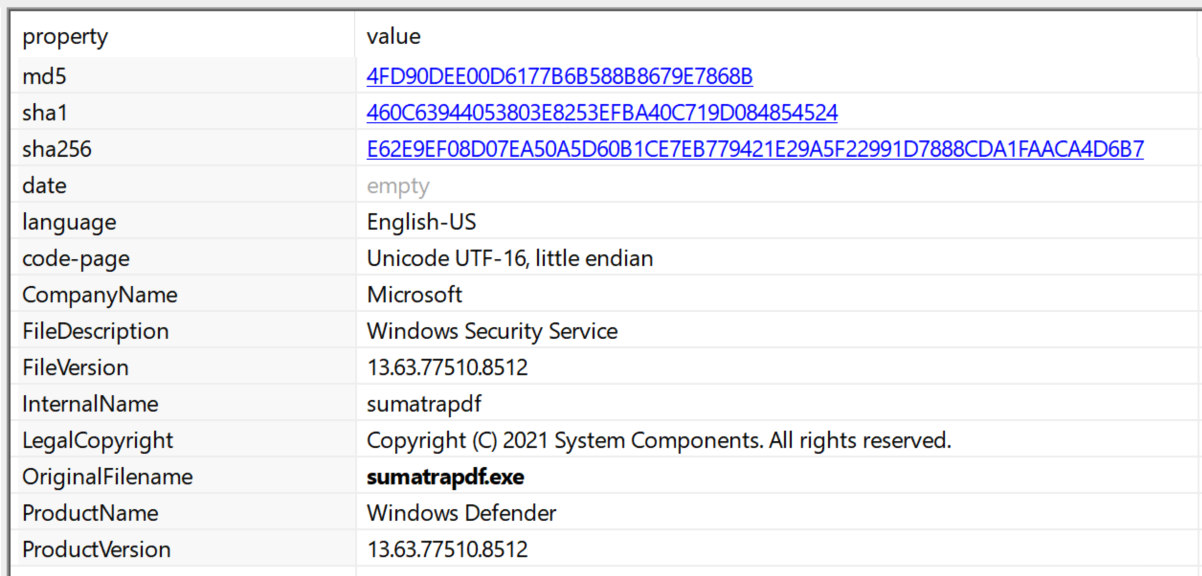
This is likely a way of evading detection by the malware author. A quick Google search shows that sumatrapdf is a light weight Portable Document Format (PDF) viewer. I don’t think Microsoft Defender would use this, but we’re on a clock so lets move on!
There were some interesting strings and imports, but no giant red flags. Certainly some cryptographic and socket related Application Programming Interface (API), but lets not jump to conclusions.
One area that caught my attention was the .bss section. This section typically stores uninitialized global variables that are populated during runtime. Because it is writable and used to store program state, I set a memory breakpoint on this region to observe whether the sample wrote any interesting data during execution.(for further reading, check out this great blog on substack https://chessman7.substack.com/p/understanding-the-bss-segment-in).
Unfortunately, all that was written was unintelligible. This could be investigated further, but we’re on a clock here! At this point I shifted to dynamic analysis to look for easily observable behavioral indicators.
Dynamic Analysis
I fired up Wireshark, Procmon and Process Hacker (yep, still have that old version on there) and executed my sample. The malware immediately exited after execution. I even tried it twice because I thought I missed it! No real evidence to go off of.

Digging through the Procmon logs there wasn’t much going on. It opened and closed some registry keys, but ultimately didn’t give us an easy with. So, without much to go off of, I threw it into a debugger.
Debugging
With limited behavioral data available, the next step was debugging the sample to better understand its execution flow. Ah, the fun part of analyzing malware. Spending way too much time in x64dbg questioning your intelligence!
First, I stepped through some of the code just to get a quick understanding of what is going on. There were some interesting loops, but nothing that immediately piqued my interest. So, I set a memory breakpoint on the .bss section for “write” to see if anything interesting was happening.
Long story short, I ended up with mostly giberish. Since we’re trying to move quickly I had to reevaluate. The section .bss is writable by nature and isn’t an indicator of malicious activity. Why was I wasting time here?
When debuggin malware for quick IOCs it is a good idea to try to use breakpoints on APIs that may be interesting. Then I looked back at some of the APIs and set a few breakpoints. VirtualProtect is always an interesting one to look at (https://learn.microsoft.com/en-us/windows/win32/api/memoryapi/nf-memoryapi-virtualprotect). Changing protections of a region of memory could indicate malcious activity.
A breakpoint was set there run was clicked a few times, and boom! We got a hit! There was a region of memory at 2CDE8D10000 that the binary made executable. Following this in dump we can see an MZ header. Lets dump this and take a closer look!

Extracted Payload Analysis
The extract binaries hash values are as follows:
- md5 = EC02D2A2BF9E988B4A6F4746106F4D2E
- sha1 = C757982FFFA2AFEA377799357983920731437BE9
- sha256 = A5F433F76F818C90E3B65A8FA46E1CB55506F5EB7883B164D3280B4FB0931D6F
At the time of analysis VirusTotal had not had this file submitted. This is sample is also a 64-bit PE file.
The first thing that is note worthy for me is the use of Thread Local Storage (TLS) callbacks. In the malware world, this can be used to execute code before the entry point of a binary. Which, is a very useful anti-analysis technique. (here is a cool real world use of this technique: https://cloud.google.com/blog/topics/threat-intelligence/newly-observed-ursnif-variant-employs-malicious-tls-callback-technique-achieve-process-injection/)
I immediately threw this in the debugger while PEStudio was doing its thing (we had about a half an hour left). I began jumping into these callbacks to try to catch what code was being executed. Eventually (with about 20 minutes on the clock) I figured this was wasting my time.
So, I checked back with PEStudio and read through some of the strings. The results, a bunch of strings referencing the extraction of data. Most notably, a powershell command showing the malware attempting to create Volume Shaddow Copies (a common credential theft technique or ransomware staging potentially). I ran strings and piped this to an output file to make it easier to read.
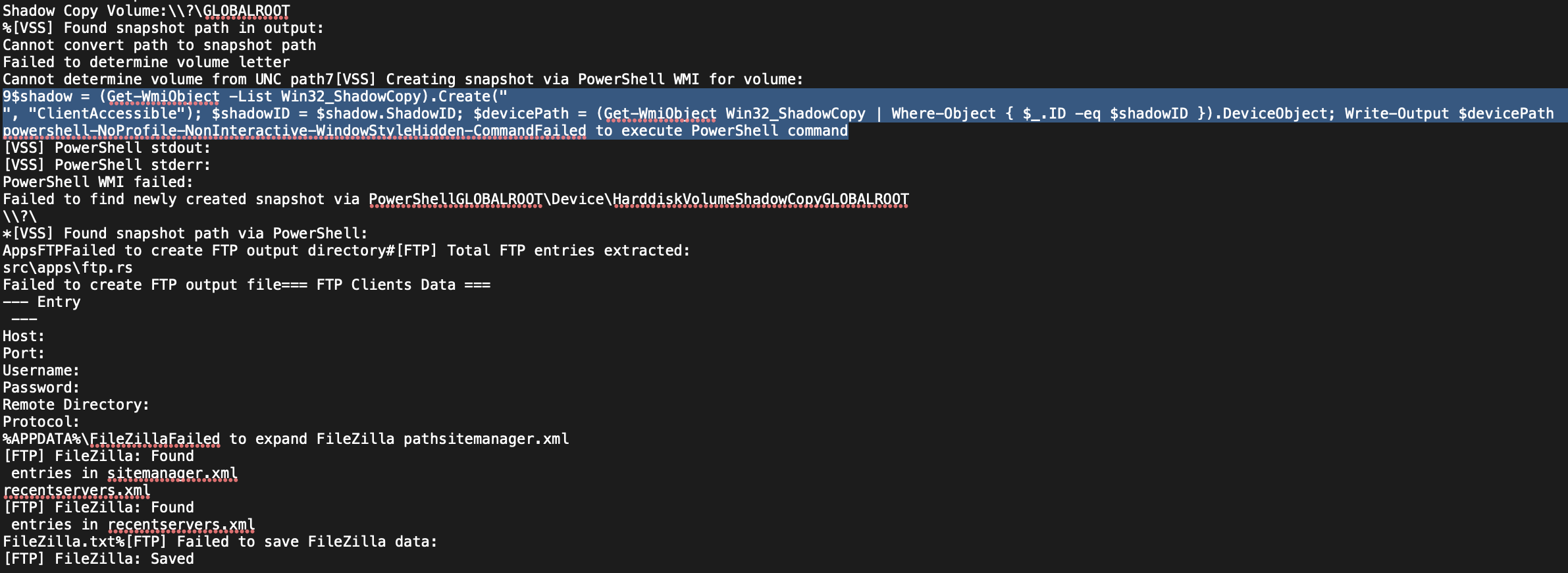
Additionally, there were some references to the malware searching for crypto wallet info, clipboard informaton, Telegram data, browser data, and even a geolocater based on the infected Internet Protocol (IP) of the computer!

Other IOCs of note was the presence of the query “SELECT origin_url, username_value, password_value FROM logins”, which appears to indicate credential harvesting. Furthermore, strings indicated that the malware looks for credentials stored in various text files and appears to search for credentials stored in browsers.
So, 5 minutes on the clock at this point. I threw it into Ghidra and tried to find the main function. I found an indirect jump where it moves the main function to RDX and calls it at function 140218a10. Then, from there, it calls GetModuleHandleA or GetProcaddress… Time! Pencils down. Just when it was getting interesting…
Conclusion
This analysis focuses on rapid static triage to identify indicators of compromise and potential malicious behavior. There were some interesting discovers made along the way. The initial sample seems to be a loader for a second stage executable that gets loaded into memory. Once in memory, this sample steal all kinds of information! If this were a high priority incident my next steps would be to inform the person who submitted the malware of my findings immediately and write a quick yara rule. Then, I would dig further into the code to attempt to identify a Command-and-Control (C2) server or anything other IOCs I missed in my first pass.
Leasons Learned
Due to the two hour time constraint, deeper reverse engineering of the binary was not performed. Future work would include analyzing the control flow in x64dbg or IDA to determine whether additional payloads or unpacking routines exist.
As you can see, this analysis is a really quick and dirty way of pulling apart samples. I wanted to take the reader on a little journey including the rabbits holes (stupid .bss) and show how this may work in real life. The analysis continues, but for this sample I think we can put it to bed for now! Its an infostealer and I have other things to look at!
If there are any other security researchers or malware analysts out there that have thoughts please reach out! The full extracted strings and YARA rule can be found here: https://github.com/mja-reversing/malware-analysis-artifacts/Rust-infostealer1
IOCs
Hash Values
- A5F433F76F818C90E3B65A8FA46E1CB55506F5EB7883B164D3280B4FB0931D6F
- b93fd9dfa9d03389fc29b4cbeff96b1ebf2da55fd90ef11e64a193bb98d66eb8
Network IOCs
- ip-api.com/json
- api.ipify.org
Yara Rule
yara
rule Infostealing_rust_sample
{
    meta:
        description = "Malware gets loaded into memory to steal information"
        author = "Matt Allan"
        date = "2026-03-09"
        sample_sha256 = "A5F433F76F818C90E3B65A8FA46E1CB55506F5EB7883B164D3280B4FB0931D6F"
        sha265_without_overlay = "1C4B444A877E78E76299062519DBE51AD9994A1A2019F7ACD6E47728767661D0"
        reference = "https://mja-reversing.github.io/blog/Two-Hour-Malware-Analysis/"
        malware_type = "infostealer"

    strings:

        // Network indicators
        $ip_api = "ip-api.com/json"
        $ipify = "api.ipify.org"

        // Stolen data file names
        $cookies = "_cookies.txt"
        $passwords = "_passwords.txt"
        $autofill = "_autofill.txt"
        $google_tokens = "google_oauth_tokens.txt"

        // Browser credential query
        $login_query = "SELECT origin_url, username_value, password_value FROM logins"

    condition:
        uint16(0) == 0x5A4D and
        3 of ($*)
}